
Share Files from an S3 Bucket with Pre-Signed URLs#
A pre-signed URL gives anyone holding the link temporary read access to a single private object in a bucket. No account, credentials or public ACL is required for the recipient, and the link stops working after a configurable time. This tutorial shows how to create pre-signed URLs, choose an expiry, and which S3 providers besides AWS support them.
How it works#
The URL contains the object path plus a signature, calculated locally from your secret access key, and an expiry time. When the link is opened, S3 validates the signature and the expiry and, if both are valid, serves the object with the permissions of the user that signed it.
The bucket and object stay private. Nothing is changed on the bucket, so no ACL or bucket policy edits are needed.
The link is only as powerful as the user who signed it. If that user’s permissions are removed or the access key is deleted, the link stops working.
Anyone with the link can download the file until it expires. Treat it like a password.
Important
Your credentials must be saved in the keychain or credentials manager. Refer to Passwords.
Create a Pre-Signed URL#
Connect to your S3 account and navigate to the file in the bucket.
Select the file.
Create the link.
Choose Edit → Copy URL → Signed URL and pick the expiry from the submenu. The link is copied to the clipboard.
You can also open File → Info (macOS ⌘I, Windows Alt+Return), switch to the S3 tab and copy the link from the Pre-Signed URL list.
Right-click the file on the mounted volume in Finder or File Explorer and choose Copy URL from the context menu. The submenu lists the origin URL, the HTTP URLs and the pre-signed Signed URL entries for each expiry. Pick one to copy it to the clipboard. Open URL opens the same entries in your browser.
Note
Share… in the same menu is a different feature. It changes the ACL on the file to allow read for everyone permanently, instead of creating a temporary link. Use Copy URL for pre-signed links.
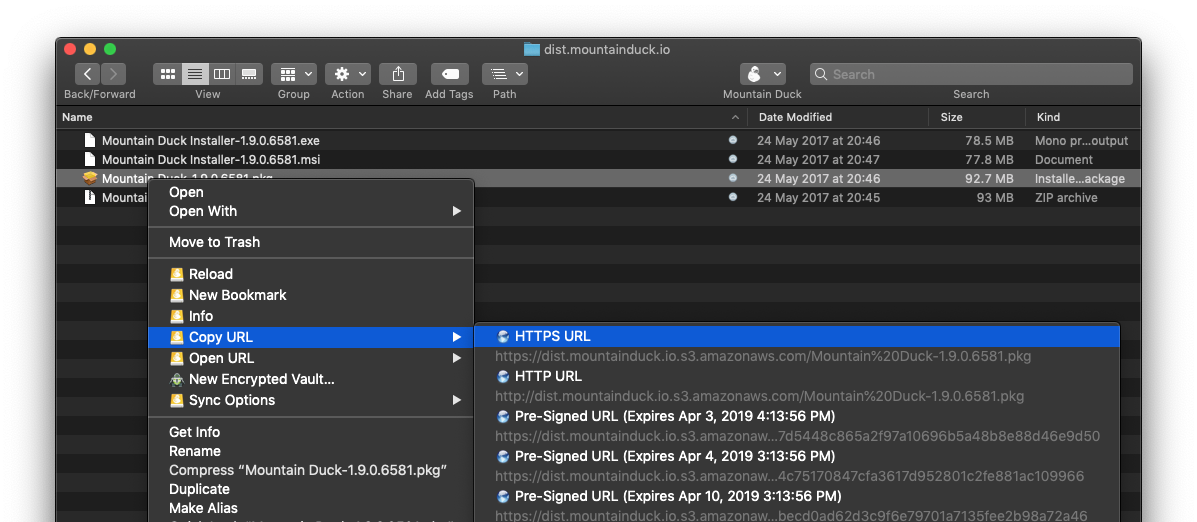
Paste the link into an email or chat. The recipient can open it in a browser or download it with a tool such as
curl:
curl -O "https://bucket.s3.eu-central-1.amazonaws.com/file.zip?X-Amz-Algorithm=...&X-Amz-Expires=86400&X-Amz-Signature=..."
Keep the quotes around the URL, otherwise the shell will cut it at the first &.
Expiry Options#
The menu offers these lifetimes:
Option |
Lifetime |
|---|---|
1 hour |
3600 seconds |
24 hours |
86400 seconds |
1 week |
604800 seconds |
1 month |
2592000 seconds (requires AWS2 signature, see below) |
Limits#
7 days maximum with AWS4 signatures. Signature Version 4, used by default, does not allow an expiry later than 604800 seconds. Links requested for longer are rejected by S3.
Temporary credentials shorten the lifetime. If you connect using IAM roles, MFA or OIDC with a session token, the link stops working when the session token expires, even when the chosen expiry is later. Use long-lived IAM user credentials if you need a link valid for several days.
Longer than a week. Select the S3 AWS2 Signature Version (HTTP) connection profile to create links valid longer than a week. This signature version is deprecated and not compatible with newer regions such as
eu-central-1.
Revoke a Link#
A pre-signed URL cannot be revoked individually before it expires. To invalidate a link early you can:
Delete or move the object.
Deactivate or delete the access key that signed the link.
Add an explicit deny in the bucket policy, for example restricting access by source IP with the
aws:SourceIpcondition.
Prefer a short expiry for sensitive files.
Use Other S3 Providers#
Pre-signed URLs are part of the S3 API (query string authentication), so they work with most S3-compatible storage providers that implement Signature Version 4, and the steps above are identical. Check the maximum expiry and which endpoint the provider supports for signed requests:
Provider |
Notes |
|---|---|
Supported. Maximum expiry of 7 days. |
|
Supported. |
|
Supported. Maximum expiry of 7 days. |
|
Supported. |
|
Supported. |
|
Supported. |
|
Supported through the S3-compatible gateway. Maximum expiry of 7 days. |
|
Supported on the S3 API endpoint only. Not available on custom domains. |
Behavior varies by implementation, so test a generated link before sharing it. Common causes of a link failing while the same file downloads fine in the client:
The region in the connection does not match the region of the bucket, so the signature is invalid.
The server clock is off, or the link was signed with a different endpoint or host name than the one used to open it (for example behind a reverse proxy or a custom domain).
The provider requires path-style addressing. Use a connection profile for the provider.